

- You are here:
- Home »
- GPS Products »
- Garmin nüvi 2555LMT 5-Inch Portable GPS Navigator with Lifetime Maps and Traffic
Garmin nüvi 2555LMT 5-Inch Portable GPS Navigator with Lifetime Maps and Traffic
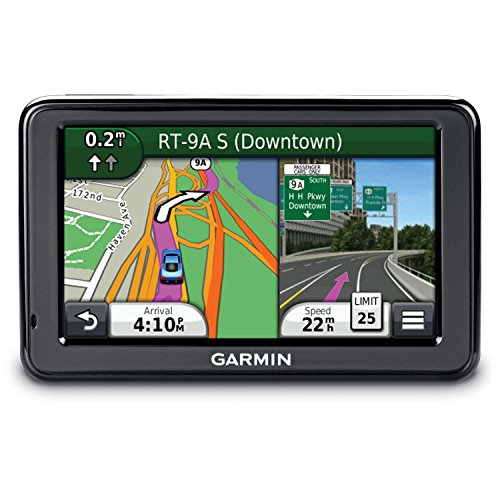
Let nüvi 2555LMT lead the way with its big 5″ (12.7 cm) touchscreen display and powerful navigation features. It includes FREE lifetime traffic¹ and map² updates, advanced lane guidance and more.
Get Turn-by-turn Directions
Garmin Guidance 2.0’s intuitive interface greets you with 2 simple choices: “Where To?” and “View Map.” Touch the screen to easily look up addresses and services and to be guided to your destination with voice-prompted, turn-by-turn directions that speak street names. It comes preloaded with maps for North America. It also comes preloaded with more than 8 million points of interest and offers the ability to add your own.
Avoid Traffic Tie-ups
With FREE lifetime traffic updates from 3D Traffic, our most extensive traffic avoidance system, nüvi 2555LMT can help you avoid delays. We check traffic conditions more than 2 billion times each month, so you can easily reroute around congestion and arrive on time.
 Enjoy FREE Lifetime Map Updates
With FREE lifetime map updates, you always have the most up-to-date maps, points of interest and navigation information available at your fingertips. Map updates are available for download up to 4 times a year with no subscription or update fees and no expiration dates.
Know the Lane Before It’s Too Late
Now there’s no more guessing which lane you need to be in to make an upcoming turn. Available in select metropolitan areas, photoReal junction view makes unfamiliar intersections and exits easy to navigate. When you approach an exit or interchange, nüvi 2555LMT will enter split screen mode and show you a realistic depiction of junctions on your route, complete with road signs and arrows that indicate the proper lane for navigation.
Go Beyond Navigation
Point-to-point navigation is just the beginning. nüvi 2555LMT features a microSD™ card slot so you can store and use detailed cityXplorer™ maps or download custom voices and vehicles for free from the Garmin Garage™. Dual-orientation functionality lets you hold the nüvi vertically or horizontally for added convenience driving or walking. The “Where  Am I?” emergency locator provides your exact latitude and longitude coordinates, the nearest address and intersection, and the closest hospitals, police stations and more. And Enhanced Exit Services tells you what services you’re approaching on the highway.
What’s in the Box: nüvi 2555LMT (Model is labeled 2555LM, the T refers to the 3D traffic cable also included in the box)
Lifetime maps¹ and traffic² (indicated by “LMT” after model number on the box) Traffic receiver with vehicle power cable (vehicle power cable is traffic receiver) Vehicle suction cup mount³ USB cable Quick start manual
¹FREE lifetime traffic updates may not be transferred to another person or another Garmin product. Lifetime traffic extends for the useful life of your Garmin traffic receiver (as long as you own a compatible Garmin GPS) or as long as Garmin receives traffic data from its traffic supplier, whichever is shorter. A traffic receiver’s “useful life” means the period during which the receiver (a) has the required technical capabilities to utilize current traffic data service and (b) is capable of operating as intended without major repairs. Traffic content not available for all areas. See traffic coverage areas.
²If you purchase a nüMaps Lifetime subscription (sold separately or bundled together with certain GPS models), you will receive up to 4 map data updates per year, when and as such updates are made available on Garmin’s website, for 1 compatible Garmin product until your product’s useful life expires or Garmin no longer receives map data from its third party supplier, whichever is shorter. A product’s “useful life” means the period during which the product (a) has sufficient memory capacity and other required technical capabilities to utilize current map data and (b) is capable of operating as intended without major repairs. A product will be deemed to be out of service and its useful life to be ended if no updates have been downloaded for such product for a period of 24 months or more. Unless otherwise stated, the updates you receive under the subscription will be updates to the same geographic map data originally included with your Garmin product when originally purchased. In some instances, your Garmin product might not have sufficient memory remaining for you to load an update to the map data, in which case you will need to either (a) select reduced map data coverage for your updates, or (b) purchase separately a microSD™/SD™ card (if and as applicable to your Garmin product) and load all or a portion of the map data coverage for your updates to the card and insert the card into the microSD/SD card slot contained in your Garmin product. If neither of the measures in (a) or (b) can be used to address your product’s lack of sufficient remaining memory, then Garmin may conclude that the “useful life” of your product has expired. Garmin may terminate your nüMaps Lifetime subscription at any time if you violate any of the terms of this agreement or your subscription. Your nüMaps Lifetime subscription may not be transferred to another Garmin product.
Product Features
- Lifetime map and traffic updates (the vehicle power cable is also the traffic receiver)
- Speed limit indicator – unit displays speed limits for most major roads,Card Reader: microSD
- Lane assist with photoReal junction views,Display resolution: 480 x 272 pixels
- Park position recall – find your car where you left it,Battery Run Time up to 2.5 hour(s)
- Preloaded City Navigator NT North America (U.S., Canada, Mexico, Puerto Rico, U.S. Virgin Islands, Cayman Islands and Bahamas)
Session expired
Please log in again. The login page will open in a new tab. After logging in you can close it and return to this page.
My 3rd Garmin – New Features and how they worked This is my 3rd Garmin GPS. I have become accustomed to their user interface and performance, so I can’t compare to other makes. I wanted to talk about the new features that attracted me to this unit and how I evaluated their usefulness on my first 3 hour road trip to a location I know by heart.Feature 1 – 5 inch screen. I am older and am having to use reading glasses to see the GPS mounted to the dash. My earlier unit was a 4 inch. I considered a 7 inch Magellan, but when I found out you couldn’t install custom POIs on the Magellan, it ruled that one out for me. We go camping frequently and I have all the state parks as custom POIs. I also have truck stops I like to use. The 5 inch display was definately an improvement for me.Feature 2 – Automated voice recognition. I definately don’t like being distracted by touching the screen to see how far the next roadside rest is (see custom POIs above). So I thought telling the GPS what I wanted made a lot of sense. When…
The Garmin nuvi 2595LMT is sweet!! I used the 2595LMT for a trip across the USA. Previously to this unit I used an older Garmin nuvi 360. There is really no comparison between the units, this one is so much better than the old one.Screen:I larger screen size is really nice at 5″. I was impressed to see the exit signs pop-up on the screen showing me which lanes I should be in. The top left corner also shows a bright white lane indicator as to where you should be with dim indicators as to where you should not be. Also nice was the fact that at the top of the screen Garmin tells you what you will be doing next.Screen Features (called layers):I went into the layer options to turn on some added detail for my trip. I activated the screen layer to show me: time for arrival, miles remaining, altitude (really cool to see why the truck was slowing down as I went up a mountain), my speed, and the road’s speed limit.Speed Features:- Don’t turn on the speed limit audible…
Why I bought a Garmin Nuvi 2595LMT Why I bought a Garmin Nuvi 2595LMT.I have owned many voice command systems in my car from both Magellan and Garmin. I use my gps in my car and in my truck when pulling my 5th wheel. I had a Magellan Maestro 4050 with voice command since 2008 and decided to look around for a new one with a few more bells and whistles. I spent a week solid reading reviews and was ready to buy a Nuvi 3490LMT but kept on reading about software issues and after trying on at BestBuy didn’t see it worth $400 for a few additional features.With that in mind I looked back to Magellan Roadmaster 1700 and a 4700 and even the 5175 Traveller and just couldn’t find one that had the features I wanted.So back to Garmin I looked and found out that The Nuvi 2595LMT had everything I like and needed and was $150 less than the NUVI 3490LMT.What I liked in the Nuvi 2595LMT5″ screenVoice CommandsSpeaks street names, turn by turnOne button to save and name a…