

- You are here:
- Home »
- GPS Navigation Car »
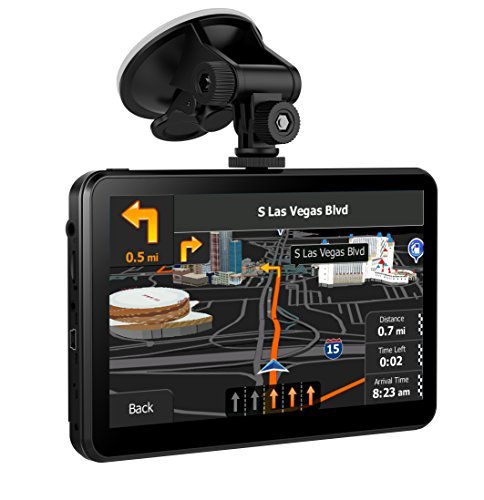
- Car GPS Navigator System, GPS Navigation for Car, 7 Inch 8 GB Vehicle GPS Touch Screen with Spoken Turn-By-Turn Directions and Lifetime Map Updates for Free
Car GPS Navigator System, GPS Navigation for Car, 7 Inch 8 GB Vehicle GPS Touch Screen with Spoken Turn-By-Turn Directions and Lifetime Map Updates for Free
Reminder:
Please start your car before you connect GPS to your car in order to protect the car charger and navigation.
*^_^* Travel Around almost the Europe with our GPS NAV*^_^*Including United States and most American countries’ maps:
Specification:
Brand:SHENEN
GPS Module: High GPS Receiver
Display Screen :7 Inches Capasitive Touchscreen
Memory(ROM): 8 GB RAM: 256.0 MB
Support TF up to 32GB
Size(LWH): 6.9×4.3×0.6 Inches
Weight: 7.95 OZ
Support Video Format : ASF, AVI, MP4, WMV, 3GP, MP4,RMVB
Support Audio Format: MP3, WAV
Support Photo Format: IPG, BMG, PNG, Electronic Album
Support E-book Format:TXT
FM (not mean FM radio, but for transferring the gps sound to your car): FM transmitter (76.0MHz -108MHz) Transfer the GPS sound to Car
Bluetooth&AV-IN : No
Display Resolution: 800×480
Operating System: Windows CE 6.0
USB Interface: USB 2.0, MINI USB
Batteries: Lithium Metal batteries
Battery: 1000mAh(Rechargeable)
Working Time(without charging):About 30 minutes
Charging Time: 1 hours
Charging Socket: 12V DC socket
Car Charger: 12-24V/1.5A
Other Applications: Games, Music player, video player, multimedia player, calculator tool, unit conversion tool, etc.
Package included
1 x GPS Navigation
1 x Mount
1 x User Manual (page 1 to 11 in English, part 12 to 23 in Germany)
1 x USB Data Cable
1 x Car Charger
notice: If you accidentally reset the GPS to factory settings or can not enter the “Navigation” when you click the “Navigation” icon, you can set the navigation path as follows: Step 1, Click the “setting” icon → Step 2, Click the “Naviconfig” icon → Step 3, Click the “…” icon → Step 4, Double click the “ResidentFlash” icon → Step 5, Double Click “All America” → Step 6, Double Click the “Primo.exe” → Step 7, Click the “√” icon
Most of common questions and attention thing are printed in user manual
Product Features
- Lifetime Map Updated FOR FREE, we have preload latest maps of America and most of American countries for your gps, If you want to update the map, please contact us and we will provide a address for you to download
- 7 Inch Touch Screen. Clear, sensitive and can respond to slight touch. The color feels natural, comfortable for your eyes
- Provide more than 40 countries’ map and nearly 40 languages, and Multi-funtion, provide video play, music play, photo view funtions and more. Support Postcode, address search
- Providing intelligent ROUTE PLANNING and SOUND WARNING, Telling SPEED LIMIT and estimated ARRIVAL TIME. Helps you safely drive.
- Support 6 months warranty. Making Full Refund for you if you not satisfied with our navigation. If you have any using problem, please contact us and we are willing to help you to solve it.
Session expired
Please log in again. The login page will open in a new tab. After logging in you can close it and return to this page.
Five Stars